
Direct Comparison: Free vs Premium vs Premium Pro
| Feature | Free Tier | Premium | Premium Pro |
|---|---|---|---|
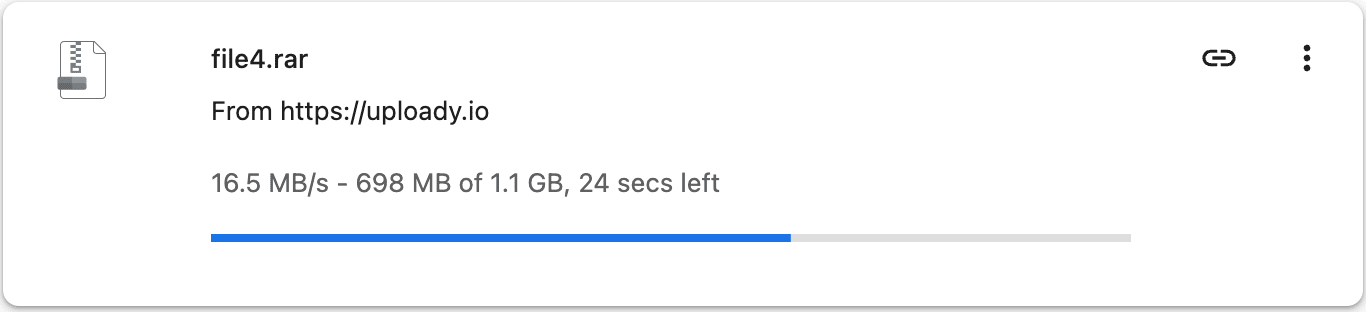
| Measured download speed | About 461 KB/s in my browser test | 16.5 MB/s for one browser file; 42.14 MiB/s combined in my JD2 test | No separate Pro speed advantage measured here; Pro is mainly a higher-quota tier |
| Daily download traffic | Free-service restrictions apply | 50–150 GB/day depending on term | 80–300 GB/day depending on term |
| JDownloader 2 | Not practical in my free testing | Worked with my Premium account | Paid-tier download-manager support; choose Pro for quota rather than a proven speed gain |
| Resume after interruption | Not available in my free test | Supported | Supported |
| Parallel downloads | Free flow is manual and restrictive | Multiple simultaneous downloads | Multiple simultaneous downloads |
| Waiting / CAPTCHA | Waiting step + CAPTCHA | Normally removed from Premium downloads | Normally removed from Premium downloads |
| File retention | 3 days as guest / 30 days registered after inactivity | Longer retention under paid-account terms | Longer retention under paid-account terms |
These speed figures are my measurements, not guaranteed rates. Server location, routing, local connection and the specific file can change the result.
The Visual Speed Difference

When Does Paying Make Sense?
One small file
If you only need a small file and do not mind the free waiting flow, paying may add little value.
Large or multi-part archives
Premium becomes much more practical when several parts must finish successfully. Faster transfer, resume support and batch handling matter more as the queue grows.
JDownloader queues
For repeated links, Premium is the useful tier. In my four-file JDownloader 2 benchmark, combined throughput reached 42.14 MiB/s. See the Uploady JDownloader setup guide for the verified account setup.
Premium vs Premium Pro: Is Pro Faster?
I have not measured a separate speed advantage for Premium Pro. Uploady differentiates these paid tiers primarily through the daily download allowance, so I would choose Pro for additional quota rather than because this site has evidence of higher throughput.
- Premium: 50–150 GB/day depending on term.
- Premium Pro: 80–300 GB/day depending on term.
For prices and cost-per-day calculations, see the Uploady pricing and plans guide.
Which Tier Should You Choose?
Occasional small downloads
Best when the file is small, non-urgent and you do not need automation.
Most regular downloaders
Best for large files, split archives and JDownloader queues that fit within 50–150 GB/day.
Heavy daily queues
Useful when your real download volume regularly exceeds the Standard Premium allowance.